UK Planners’ Firefly AV Checklist for Choosing Slido vs Mentimeter
Date added: 3/09/2026

For enterprise town halls needing tight Q&A moderation, Microsoft Teams or Webex integration and admin controls, Slido is the stronger fit. For fast, browser-first polling and quizzes where presenters want zero setup time, Mentimeter usually wins. An AV hire and event production company based in Leeds and Preston working UK-wide runs both platforms on client events and knows where each struggles on the night.
TL;DR:
- Slido offers stronger moderation, enterprise controls, and integration options, making it ideal for large, public-facing, or hybrid events requiring filtering and approval of questions.
- Mentimeter excels in quick setup and polished visuals, best suited for trainers, webinars, or smaller internal sessions where instant results are prioritized.
- Both tools support browser-based participant joining via URL or QR code, but venue Wi-Fi issues can disrupt live polling and Q&A, requiring contingency plans.
- Operational success depends on rehearsing exact integrations on the actual event laptop and assigning dedicated moderation staff to filter questions live.
- For complex events needing extensive data exports, single-platform branding, and structured moderation, Slido is the more suitable choice over Mentimeter or gamified tools like Kahoot!
Table of Contents
- Slido vs Mentimeter: how the two compare feature by feature
- What do the poll, Q&A and quiz features actually do differently?
- How do you choose the right engagement tool, and what should you ask suppliers?
- How does Firefly AV rehearse and run these tools on event day?
- Do quiz and gamification features matter for your event?
- How do participants actually join a live session?
- How do support and training resources compare?
- Does event size change which tool makes sense?
- Which devices and apps do these platforms support?
- What happens if the venue’s internet connection fails?
- How much can you customise the look and branding?
- When should you use a separate engagement layer instead of an integrated platform?
- Let Firefly AV run the engagement tech so you don’t have to
- Sources
- FAQ
Slido vs Mentimeter: how the two compare feature by feature
Both platforms cover the same core ground: live polls, word clouds, quizzes and audience Q&A. The difference shows up in the edges, particularly moderation depth, integration reliability and what happens to your data afterwards.
G2’s comparison data puts the two close together on ease of use, but Slido scores slightly higher on moderation and enterprise controls in user reviews. That tracks with how each product is built: Slido leans into admin dashboards, approval queues and role-based access, while Mentimeter tends to be quicker to set up for a presenter who just wants a poll live in ninety seconds.
Wooclap sits closer to Mentimeter in spirit but leans harder into education, with features built around active learning rather than corporate Q&A. Quizotic turns up in comparison articles for markets where local billing matters, including payment options such as UPI in some regions, which is not typically relevant for a UK-billed event but worth knowing if you run international sessions. Kahoot! is the outlier here: it is a gamified quiz tool first, not a general engagement platform, and it shows.
| Tool | Best for | Core interactive features | Integrations & workflow | Pricing / free tier | Enterprise controls & security | Analytics & exports |
|---|---|---|---|---|---|---|
| Slido | Corporate town halls, moderated Q&A, Teams/Webex events | Polls, word clouds, quizzes, ranked Q&A, upvoting | PowerPoint, Google Slides, Teams, Webex | Free tier limits polls per event; paid plans unlock exports | Admin dashboards, SSO on higher tiers, moderation queues | CSV/PDF exports, participant-level data on paid plans |
| Mentimeter | Fast polls and word clouds for trainers and webinars | Polls, word clouds, quizzes, open text, rating scales | Browser-first; works without importing slide files | Free tier with capped questions per presentation | Basic team controls; enterprise tier for larger orgs | Result exports, summary reporting |
| Wooclap | Interactive classroom sessions | Polls, quizzes, brainstorms, matching exercises | LMS-oriented integrations | Free tier for small groups | Standard account controls | Session-level exports |
| Quizotic | Regions needing local billing options | Quizzes, polls | Varies by market | Regionally priced plans | Basic account controls | Standard exports |
| Kahoot! | Training sessions and competitive quiz formats | Gamified quizzes, leaderboards, team modes | Standalone app, limited slide integration | Free tier for small games | Basic account controls | Game reports, score exports |
A few things matter more than the table can show. Neither Slido nor Mentimeter requires you to abandon your existing slide deck, but they do it differently: Slido layers on top of PowerPoint or Google Slides, while Mentimeter often replaces the presentation entirely with its own browser-based slides. If your event runs on a house PowerPoint template with brand guidelines locked down, that distinction decides your workflow before you’ve even opened either tool.
- Slido fits events where someone needs to filter, merge or hide questions before they hit a screen in front of five hundred people.
- Mentimeter fits sessions where the presenter is running the show solo and needs results on screen within seconds of closing a poll.
- Wooclap fits recurring teaching sessions where gamified quizzes reinforce learning across weeks, not a single event.
- Quizotic fits organisers running events in markets with different payment norms, though UK organisers will rarely need this over the mainstream options.
- Kahoot! fits a single training session that wants energy and competition over nuanced data capture.
What do the poll, Q&A and quiz features actually do differently?
The features overlap on a spec sheet, but they behave differently once you’re stood in front of a live room.
Poll types and visual output. Both platforms handle multiple choice, rating scales, open text and word clouds. Word clouds work well for warm-up questions (“describe your job in one word”) but fall apart with more than about fifty responses, becoming visual noise rather than insight. Structured polls (multiple choice, ranked) hold up far better at scale and are what you want for anything you plan to act on afterwards, like a vote on conference topics.
Q&A moderation. This is where the gap widens. Slido supports pre-approval queues, upvoting and anonymous submission, letting an operator filter what reaches the main screen before a presenter ever sees it. That matters at anything public-facing, an AGM, a shareholder briefing, a press event, where an unmoderated question box is a genuine reputational risk. Mentimeter offers Q&A too, but the moderation tooling is lighter, which suits smaller internal sessions better than public ones.

Integration caveats. Both vendors document PowerPoint, Google Slides, Teams and Webex support. In practice, Slido’s own Teams FAQ notes that PowerPoint Live doesn’t work with the Slido PowerPoint add-in in some Teams meeting formats. That’s not a minor footnote. It means the version of the software you tested on your laptop at home may not behave the same way on the show laptop connected to the venue’s AV desk.
Analytics and exports. Free tiers on both platforms restrict export formats and participant-level detail. Paid plans typically unlock CSV or PDF exports and richer participant data, which matters if you need to report attendance or engagement metrics back to a client or sponsor.
Pro Tip: Rehearse the exact integration you plan to use, on the exact laptop you’ll use on the day, not a similar one. Slido’s own community documentation flags integration quirks between Teams meeting formats that only show up under real conditions, and the same caution applies to any browser-based tool running through a venue’s AV signal chain.
How do you choose the right engagement tool, and what should you ask suppliers?
Work through this in order rather than picking on feature lists alone.
- Size and format first. A two-hundred-seat conference hall behaves nothing like a forty-person webinar. Hall events need results visible on a large screen or LED wall; webinars need results visible on a shared screen inside the meeting software itself.
- Decide hybrid or in-room. If you’re running Teams or Webex alongside an in-room audience, test the exact integration path before committing, since behaviour differs between meeting formats as noted above.
- Map reporting needs. If a client or board needs a post-event report, confirm which tier unlocks CSV or participant-level exports before you buy, not after the event.
- Check slide workflow compatibility. If your deck is locked to a brand template, favour a tool that layers on top of PowerPoint rather than one that replaces the presentation format.
Before signing anything, put these questions to the vendor directly:
- How long is response data retained, and can we set our own retention period?
- Who are your subprocessors, and where is data hosted?
- Does the platform support SSO, and at which pricing tier?
- What export formats are available, and do they include participant-level data?
ICO guidance on events treats audience response data as event data requiring a documented purpose, access control and a retention decision, which means “we’ll ask the vendor after we’ve signed” is the wrong order of operations.
Red flags worth pausing on: no stated retention control, no moderation queue for public Q&A, or integration documentation so thin you can’t find an answer about Teams or Webex compatibility. On pricing, expect free tiers to cap poll counts and lock exports, with paid plans running from modest monthly SaaS pricing up to enterprise-tier day licences for one-off large events; Slido’s own pricing page lays out where those limits sit.
How does Firefly AV rehearse and run these tools on event day?
Firefly AV’s operational checklist for engagement tech starts well before doors open, not on the day itself.
- Test the chosen integration on the actual show laptop, not a spare, including a full PowerPoint Live or Teams run-through where relevant.
- Verify the event code and QR code display correctly on the confidence monitor and any secondary screens before the audience arrives.
- Assign a named operator with moderation permissions, separate from the presenter, so questions can be filtered without breaking their flow.
- Agree a presenter handover and results-reset process in the run sheet, not verbally on the day.
- Set a retention practice for exports: a sensible default is storing raw data in an access-controlled folder for three months, then deleting it, which mirrors the retention period noted in Slido’s own ICO data protection filing.
For visibility, results need to read clearly across a room, which is a kit question as much as a software one. An Absen LED wall handles poll results and word clouds far better than a stretched projector image in a bright conference hall, and a Panasonic projector with sufficient brightness is the better call for smaller, dimmer rooms. Moderation runs smoother through an Allen & Heath console feeding Sennheiser handheld or lapel mics to the operator, so questions can be read aloud clearly if the room’s Wi-Fi stumbles.
Pro Tip: Build a low-tech failover into your run order, a short URL written on a slide, a paper vote, or a spoken show of hands, in case venue Wi-Fi drops. It sounds basic, but it’s the difference between an awkward five-minute pause and a session that barely notices.
Do quiz and gamification features matter for your event?
They matter more than most organisers expect, but only for the right format. Kahoot! remains the reference point here: leaderboards, timed answers and team modes create genuine energy in a training session or an away-day icebreaker, which is exactly why it’s still widely used despite offering less depth elsewhere.
Slido and Mentimeter both support quizzes, but they’re built as one feature among several rather than the whole product. That makes them better suited to a single gamified segment inside a longer agenda, a quick knowledge check after a training module, rather than an entire session built around competition. Wooclap leans further into gamified learning for recurring educational contexts, with quiz formats designed to reinforce material across multiple sessions rather than a single event.
If gamification is the primary goal, a dedicated quiz tool will usually feel more polished than a general engagement platform’s quiz mode. If it’s a five-minute segment inside a two-hour conference, running it through the same tool you’re already using for polls and Q&A saves a platform switch mid-agenda, which is its own kind of operational risk. Switching tools mid-session means a new join code, a new QR code, and a room full of people fumbling with their phones again just as momentum was building.
How do participants actually join a live session?
Every platform in this comparison uses the same basic mechanism: a short join code or URL, usually backed by a QR code, that participants enter in a mobile browser. No app download is required to participate in a Slido or Mentimeter session, which matters at events where attendees are reluctant to install anything new on their phone.
Kahoot! traditionally leans slightly more on its own branded join flow, but participants still join via a browser or the Kahoot! app using a game PIN. Wooclap and Quizotic follow the same event-code-plus-QR pattern as Slido and Mentimeter.
The practical risk sits in visibility, not mechanics. A QR code that’s too small on a confidence monitor, or a join code buried in tiny text at the bottom of a slide, is the single most common reason engagement numbers come in low. Display the code full-screen for at least thirty seconds before you need responses, and repeat it verbally. For multi-session events, decide upfront whether each session runs as a separate event code, cleaner reporting but re-joining friction, or one continuous code across the day, easier for attendees but messier if you need to isolate session-by-session data afterwards.
How do support and training resources compare?
Slido offers a public community forum, help centre documentation and account-level support that scales with plan tier, with enterprise customers typically getting dedicated onboarding. Its Teams integration FAQ, sourced from that same community, is detailed enough to flag real integration quirks rather than just marketing copy.
Mentimeter’s help centre is built around quick self-service guides, reflecting its emphasis on presenters getting started without training. That fits its positioning as the faster-to-set-up option, but it means less depth available if you hit an edge case involving enterprise SSO or complex moderation.
Wooclap and Quizotic both offer help documentation, though neither has the volume of community-generated troubleshooting content that Slido has built up over years of enterprise use. Kahoot! offers strong resources for its core education audience, given its roots in classroom use, but less for corporate-specific integration questions.
For a one-off high-stakes event, the practical answer is the same regardless of vendor: don’t rely on a support ticket queue on the day. Rehearse, document your own run sheet, and know who your on-site operator is.
Does event size change which tool makes sense?
Yes, considerably. A twenty-person workshop and a two-thousand-seat conference are different engineering problems, not just different scales of the same one.
At small scale, either Slido or Mentimeter works comfortably, and the free tiers on both often cover the need entirely. At mid-scale, several hundred attendees, moderation starts to matter more than raw polling speed, because an unfiltered Q&A box with three hundred people watching becomes unmanageable fast. This is where Slido’s moderation depth earns its keep.
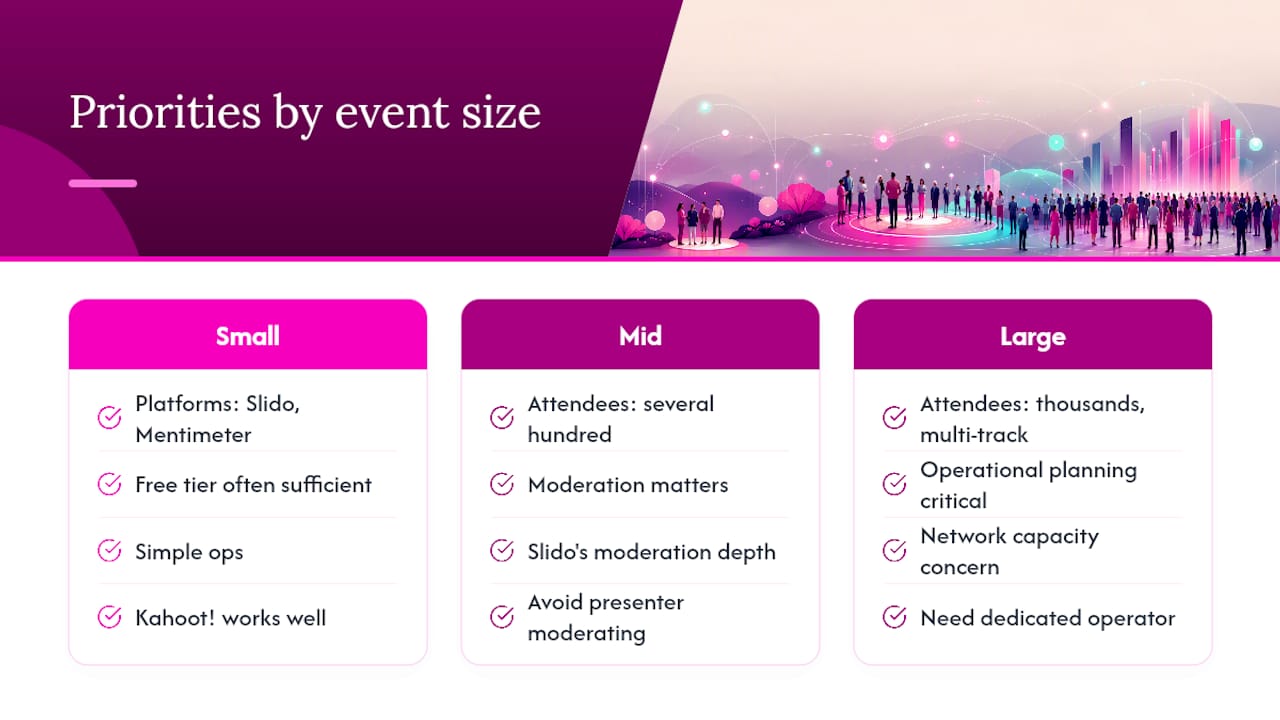
At large scale, thousands of attendees or multi-track conferences, both platforms can technically handle the volume, but operational planning becomes the real constraint: network capacity at the venue, screen visibility across a large hall, and having a dedicated operator rather than asking the presenter to moderate their own Q&A while also speaking. Kahoot!'s gamified format tends to work better at smaller scale, since leaderboard-driven competition loses some of its charm once the room is too large for anyone to feel individually seen.
Which devices and apps do these platforms support?
Participant access is browser-based across the board for Slido, Mentimeter, Wooclap and Quizotic, meaning any modern smartphone, tablet or laptop with a web browser can join without installing anything. That’s a deliberate design choice, since forcing an app download ahead of a session reliably kills participation numbers.
Kahoot! differs slightly: while it supports browser joining, it also offers a dedicated mobile app that many regular users install, particularly in education settings where the same group plays repeatedly.
On the organiser and presenter side, all five platforms offer desktop-first control panels, with Slido and Mentimeter both providing dedicated presenter views distinct from the participant-facing display. This separation matters operationally: the presenter or operator needs to see incoming responses and moderation queues without exposing that same view to the audience screen.
What happens if the venue’s internet connection fails?
Every platform in this comparison, Slido, Mentimeter, Wooclap, Quizotic and Kahoot!, requires an active internet connection for both the organiser dashboard and the participant join experience. None of them offer a genuine offline mode for live polling or Q&A.
That single fact should shape your event-day contingency planning more than any feature comparison. A venue with unreliable Wi-Fi, a common problem in older conference centres and some hotel function rooms, can take down your entire engagement segment regardless of which platform you chose.
The practical mitigation is a manual failover built into the run order in advance: a spoken show of hands, a paper ballot for anything that needs a formal vote, or simply a pause while the technical team resets a router. Building this into the run sheet, rather than improvising on the spot, is the difference between a five-minute hiccup and a visibly broken session in front of a paying audience.
How much can you customise the look and branding?
Mentimeter is generally regarded as the stronger option for polished, on-brand visuals straight out of the box, with themes, colour customisation and layout options aimed at presenters who want something that looks designed rather than default. Slido supports branding too, including custom logos and colour schemes on paid tiers, but its visual customisation sits a notch behind Mentimeter’s presentation-first design.
Wooclap and Quizotic offer more limited branding controls, generally sufficient for internal sessions but less suited to a client-facing event where visual polish reflects directly on your organisation. Kahoot! offers some customisation within its own game formats but is less flexible for matching a specific corporate brand identity.
For events where the room’s screens are also carrying your event branding, LED wall content or projected slide templates, keeping poll and quiz visuals consistent with everything else on screen makes a genuine difference to how professional the whole session feels. It’s worth checking exactly what a paid tier unlocks on the branding front before assuming the free version will match your slide deck.
When should you use a separate engagement layer instead of an integrated platform?
The workflow trade-off matters more than most comparisons admit. A separate engagement layer like Slido keeps your existing PowerPoint file untouched, which suits organisations with locked brand templates and legal sign-off on decks. An integrated platform like Mentimeter ties engagement directly into its own slide format, which is faster to build but means abandoning your existing deck.
Moderation and enterprise controls justify the extra complexity of a separate layer once your audience is public-facing or large enough that an unmoderated Q&A becomes a risk rather than a convenience. Below that threshold, the operational overhead usually isn’t worth it, and the presenter’s cognitive load matters just as much as the feature list. Handing someone one more login to manage while they’re already nervous about presenting rarely improves the outcome.
— Michael
Let Firefly AV run the engagement tech so you don’t have to
Slido and Mentimeter both do their jobs well, but someone still has to build the event code into the run sheet, rehearse the integration on the actual show laptop, and sit at a moderation desk filtering questions while the presenter focuses on the room. An AV hire and event production company based in Leeds and Preston working UK-wide folds that entire layer into full event production services, supplying crew who test the polling platform against your PowerPoint file days before doors open.
For hybrid sessions running through Teams or Webex, Firefly AV’s virtual and hybrid event delivery covers the technical integration end to end, including the operator role that moderates Q&A live rather than leaving a presenter to manage it solo. Get in touch to talk through your event date and format, and Firefly AV will confirm which engagement platform fits your room, your audience size and your existing slide workflow before you commit to anything.
Sources
- Attend an event, seminar or workshop — ICO privacy notice
- Slido | Reviews, pricing & demos — SoftwareAdvice GB
FAQ
Can I use Slido for free?
Yes, Slido offers a free tier covering core polling and Q&A features, though it caps the number of polls per event and restricts exports. Slido’s own pricing page sets out exactly where those limits sit, and paid plans are needed for unlimited polls, moderation depth and full data exports.
How much does Slido cost per month?
Current pricing tiers and exact monthly figures are published on Slido’s pricing page rather than fixed here, since plans and limits change. Expect a jump in price between the free tier and any plan unlocking moderation queues, exports and SSO.
Which is better, Slido or Kahoot!?
They solve different problems. Slido is built for structured Q&A, polling and moderation at corporate events, while Kahoot! is built for gamified, competitive quizzes in training or education settings, so the “better” choice depends entirely on whether your priority is moderated audience interaction or quiz-based energy.
Is Slido better than Poll Everywhere?
This comparison focuses on Slido, Mentimeter, Wooclap, Quizotic and Kahoot!, and Poll Everywhere sits outside that scope. Within the platforms compared here, Slido stands out specifically for enterprise moderation and integration depth with Teams and Webex, which is the more relevant comparison for most UK event organisers.
Does Firefly AV supply the engagement software itself?
This AV hire and event production company does not sell Slido or Mentimeter licences directly, but event production and hybrid delivery teams can operate these platforms on behalf of clients, handling integration testing, moderation and on-the-day technical management as part of managed AV packages.
What’s the main practical difference between Slido and Mentimeter?
Slido leans towards enterprise moderation, admin controls and integration with Teams or Webex, making it suited to larger or public-facing events. Mentimeter leans towards speed of setup and polished visual output, making it a faster choice for trainers and webinar presenters who want results on screen with minimal preparation.