Conference AV hire in Glasgow: step-by-step guide
Date added: 6/08/2026
Start by completing an eight-question AV brief and locking in your main-room rigging, dedicated internet circuit, and technician cover before you contact a single supplier.
TL;DR checklist — must-book items:
- Main-room screens or LED wall (book 6–8 weeks out minimum)
- PA system and monitor speakers
- Dedicated wired internet circuit (not venue Wi-Fi)
- AV operator/supervisor for the full event day
- IMAG decision (rooms over 40–50 metres deep, or 250+ attendees)
- Recording decision (single-camera or multi-camera)
- Livestream/hybrid decision and encoder setup
- Wireless microphone count per session
Pro Tip: Send an itemised RFP with your eight-question AV brief to suppliers before the first call. It narrows quote ranges dramatically and keeps every vendor working from the same scope.
Contact Fireflyav for a Glasgow-specific quote once your brief is complete.
Table of Contents
- How does conference AV hire in Glasgow work, step by step?
- What equipment do you need for each conference format?
- How do you test and rehearse AV for a hybrid conference?
- What is your contingency plan if AV fails on the day?
- Sample AV run-sheet for a conference day
- Key takeaways
- What most Glasgow conference planners get wrong
- Fireflyav handles your Glasgow conference AV from brief to strike
- Useful sources and further reading
How does conference AV hire in Glasgow work, step by step?
The process runs across seven stages. Miss one and you pay for it on the day.
Step 1 — Pre-production (8+ weeks out)
Define your event format (in-person, hybrid, multi-room), confirm attendee numbers, and complete the eight-question brief covering screens, IMAG, recording, livestream, mics, lighting, room layout, and breakout rooms. Request itemised quotes, not package prices, so you can see and trim each line item.
Step 2 — Site survey (6–7 weeks out)
Visit the venue with your AV supplier. Use this multi-venue logistics checklist to confirm: available rigging points and weight limits, single-phase and three-phase power positions, wired internet infrastructure (fibre drop location and bandwidth), sightlines from every seat, loading-bay access times, and any venue AV restrictions.
Step 3 — Hire booking (5–6 weeks out)
Confirm equipment, technician days, and delivery schedule in writing. Verify PAT-test certificates for all electrical equipment, check the supplier’s public liability insurance (minimum £5 million is standard for UK events), and agree a signed contract covering cancellation terms and equipment damage liability.
Step 4 — Setup (event day minus one, or morning of)
AV crew arrives before venue opens to delegates. Crew rigs screens, runs cables, positions speakers, sets monitor levels, and connects the dedicated internet circuit. Conference mic systems are tested at the lectern and at every panel seat.
Step 5 — Rehearsal and technical run
Run every presenter through their slides on the actual system. Check confidence monitors, clicker range, and mic gain. For hybrid events, run a full encoder and streaming test with a remote participant before doors open.
Step 6 — Event-day management
The AV supervisor follows the run-sheet, cues transitions, and monitors audio levels throughout. A dedicated streaming operator manages the encoder and remote audience feed independently.
Step 7 — Strike and post-event
De-rig begins as soon as the final session closes. Confirm all equipment is accounted for, return borrowed venue items, and collect any recording files or stream archives before leaving site.
What equipment do you need for each conference format?
Equipment needs vary sharply by format. Over-specifying wastes budget; under-specifying kills the delegate experience. Fireflyav’s equipment guide for event planners covers the full taxonomy, but here is a practical starting point.
Small in-person conference (under 100 delegates)
Two 65" display screens, a compact PA with two tops and a sub, two handheld wireless mics, one lapel mic, a basic mixer, a presentation laptop with HDMI distribution, and a confidence monitor at the lectern.
Large auditorium (250+ delegates)
Projection or LED wall (minimum 5m wide), line-array PA system, IMAG camera rig with a vision mixer and confidence monitors, six or more wireless mics (handheld, lapel, and panel), stage lighting wash, and a dedicated AV supervisor plus audio and video technicians.
Hybrid or livestreamed event
Everything in the in-person list, plus: a dedicated wired internet circuit, a hardware encoder (such as a Birddog Studio NDI unit), a streaming platform licence, a streaming operator, at least one camera on a tripod for the remote feed, and a graphics package for lower-thirds and title cards. Venue Wi-Fi is not sufficient for reliable streaming.
Multi-room breakout configuration
Each breakout room needs its own display, a compact speaker, at least one wireless mic, and a separate signal path back to a central AV rack. Intercom between rooms (such as a Green-Go wired beltpack system) keeps crew coordinated without disrupting sessions.
How do you test and rehearse AV for a hybrid conference?
Testing is where hybrid events succeed or fail. A full technical rehearsal, not a five-minute soundcheck, is the standard.
Run the encoder test at least 90 minutes before doors open. Confirm the stream is reaching the platform, check audio sync against video (lip-sync drift above 100ms is noticeable to remote viewers), and verify that remote participants can be heard clearly in the room. For multi-camera setups, the vision mixer operator should cut between cameras during the rehearsal so presenters know what to expect on the confidence monitor.
Check the hybrid AV technical guide for a full encoder and streaming operator checklist. The key tests: ingest URL and stream key confirmed, bitrate stable at the agreed setting, audio levels peaking at around -12 dBFS, and a remote test caller confirmed on screen before the room fills.
Slide transitions, video playback, and any pre-recorded content should all be cued and tested in sequence. If a presenter uses a clicker, test its range from the furthest point they will stand.
What is your contingency plan if AV fails on the day?
Every Glasgow conference AV plan needs a spares list and a fallback sequence. Equipment failures are rare with properly maintained kit, but the plan should exist before the event, not during it.
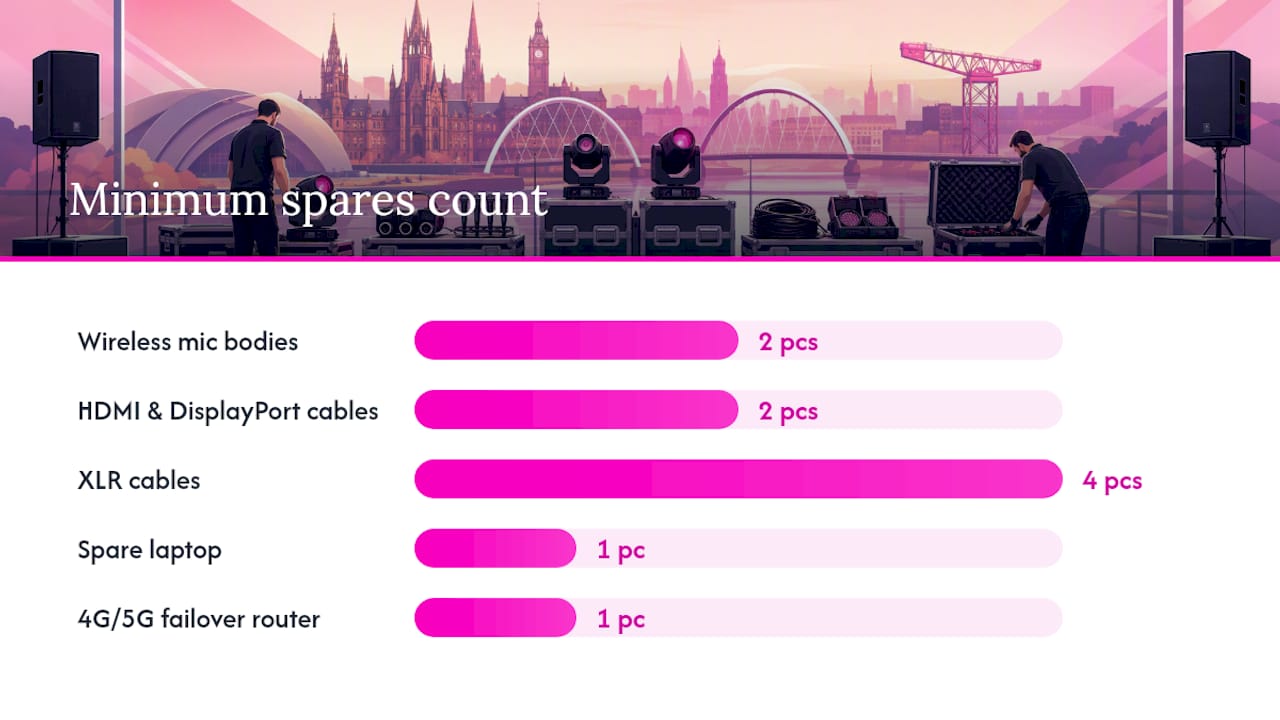
Minimum spares list:
- Two spare wireless mic bodies (charged and frequency-matched)
- Spare HDMI and DisplayPort cables (2m and 5m)
- Spare laptop with a copy of all presentations loaded
- Spare projector lamp or a second display if using projection
- Spare XLR cables (at least four)
- Backup internet connection (4G/5G router as a failover for streaming)
Fallback sequence for common failures:
- No signal to screen: swap cable first, then source device, then check display input.
- Mic dropout: switch to spare body; if RF interference, change frequency channel.
- Stream drops: switch encoder to 4G failover router; notify remote attendees via chat.
- PA failure: fall back to a compact Bluetooth speaker for voice-only coverage while the main system is diagnosed.
The AV supervisor should brief all technicians on the fallback sequence during the pre-event setup, not at the moment of failure.
Sample AV run-sheet for a conference day
Adapt this template to your session timings. Times are illustrative.
| Time | Action | Owner |
|---|---|---|
| — | Crew arrives, begin rig and cable run | AV Supervisor |
| — | PA system powered, mic check at lectern | Audio Tech |
| — | Screen/LED wall signal test, slide deck loaded | Video Tech |
| — | Encoder live, stream test with remote caller | Streaming Operator |
| — | Full technical rehearsal with first presenter | All AV crew |
| — | Doors open to delegates | AV Supervisor monitors |
| — | Session 1 begins — AV supervisor on cue | AV Supervisor |
| — | Break — mic batteries checked, spare mics on standby | Audio Tech |
| — | Session 2 begins | AV Supervisor |
| — | Lunch break — stream paused, recording continues | Streaming Operator |
| — | Session 3 begins — breakout rooms active | All AV crew |
| — | Final session closes — begin de-rig | All AV crew |
| — | Strike complete, recording files archived | AV Supervisor |
Key takeaways
Hiring AV for a Glasgow conference requires a completed eight-question brief, a venue site survey, itemised quotes, and confirmed technician cover before any equipment is booked.
| Point | Details |
|---|---|
| Complete the brief first | An eight-question AV brief sent with your RFP keeps quotes comparable and prevents scope surprises. |
| Book screens and crew early | Main-room screens, PA, and AV operators should be confirmed 6–8 weeks before the event date. |
| Never rely on venue Wi-Fi | A dedicated wired internet circuit is required for reliable livestreaming at any Glasgow conference. |
| IMAG threshold | Rooms deeper than 40–50 metres, or events with 250+ attendees, need IMAG to serve the back rows. |
| Fireflyav for Glasgow | Fireflyav provides dry hire, technicianed hire, hybrid streaming, and on-site technical support for Glasgow conferences. |
What most Glasgow conference planners get wrong
The mistake I see most often is not the equipment list. It is the brief. Planners arrive at a first supplier call with a headcount and a date, and nothing else. The result is a quote range so wide it is useless for budget approval.
The second recurring problem is venue Wi-Fi. Glasgow venues vary enormously in their network infrastructure, and even a venue that claims “high-speed internet” may share bandwidth across all event spaces simultaneously. A dedicated bonded or fibre circuit, ordered four to six weeks in advance, is the only reliable foundation for a livestreamed session.
Technician roles and arrival times:
- AV Supervisor: arrives first, oversees full rig, manages run-sheet, single point of contact for the planner. On site from load-in to strike.
- Audio Technician: sets PA, patches mics, monitors levels throughout. Arrives with supervisor.
- Video Technician/Camera Operator: rigs screens, manages signal routing, operates IMAG camera if required.
- Streaming Operator: configures encoder, monitors stream health, manages remote audience feed. Arrives 90 minutes before first session.
- Stage Electrician: handles power distribution, PAT compliance, and lighting rig. Required for larger productions.
Indicative UK cost ranges (for budgeting purposes):
| Element | Indicative range | Notes |
|---|---|---|
| Basic corporate AV package (Glasgow) | from £650 | Dry hire, 2 × 65" screens, speakers, 4 wireless mics |
| IMAG typically adds £4,000–£8,000 to a production and is recommended for rooms over 40–50 metres deep or events with 250+ attendees. | ||
| Single-camera recording (4-hour event) | costs several hundred to a few thousand pounds | Basic record-to-file |
| Multi-camera switched recording | costs several thousand pounds | Includes vision mixing and edit |
| Produced livestream (multi-camera, graphics) | costs several thousand pounds | Full production with lower-thirds |
| Dedicated internet circuit | costs several hundred to a few thousand pounds | Essential for streaming; book several weeks ahead |
US dollar figures from the source have been retained as indicative ranges only; confirm sterling equivalents with your supplier at time of booking.
When sending your RFP, include:
- Event date, venue name, and room dimensions
- Confirmed attendee count and session format
- IMAG decision (yes/no)
- Recording requirement (none/single-camera/multi-camera)
- Livestream requirement and target platform
- Microphone count per session
- Breakout room count and AV requirements per room
- In-house AV already provided by the venue
Ask suppliers for case studies from comparable events, proof of public liability insurance, PAT certificates for all electrical equipment, and a written service agreement covering on-site support response times.
Fireflyav handles your Glasgow conference AV from brief to strike
Fireflyav covers the full production chain for Glasgow conferences: dry hire for planners who have their own crew, technicaned hire with an on-site operator, hybrid streaming production, and post-event recording deliverables. You get one supplier managing screens, sound, lighting, and the stream, rather than coordinating three separate vendors on the day.
To get an accurate quote fast, send Fireflyav your event date, venue name and floorplan, attendee numbers, session timings, your completed eight-question brief, and details of any in-house AV the venue provides. The team can advise on broadcast-quality streaming setups for hybrid conferences and confirm technician staffing for your specific room configuration.
Submit your project brief and Fireflyav will return a detailed, itemised quote for your Glasgow conference.
Useful sources and further reading
Use these links when preparing your RFP, running a site survey, or specifying equipment for a Glasgow conference.
- How to Scope AV for a Conference: the 8-Question Brief That Prevents a $30K Surprise | corporateevents.at
- How to Hire the Right AV Company for Your Conference Room | CSAV Systems
- Corporate AV Package Hire Glasgow – RS100 Pro Sound & Light – Professional Audio & Lighting Solutions
- Audio visual equipment explained for event planners | FireflyAV
- Hybrid event AV: a technical guide for UK planners | FireflyAV
- AV Technical Support and Event Production Support in Leeds | FireflyAV
- AV logistics for multi-venue events: the UK planner’s guide | FireflyAV
How to use these links when preparing an RFP or site survey: download or bookmark the eight-question brief before your first supplier meeting, use the Fireflyav equipment guide to verify terminology in quotes you receive, and share the hybrid AV guide with your venue contact if you are planning a streamed session so both parties understand the infrastructure requirements.