Gaming arena AV explained: a UK planner’s guide
Date added: 3/08/2026
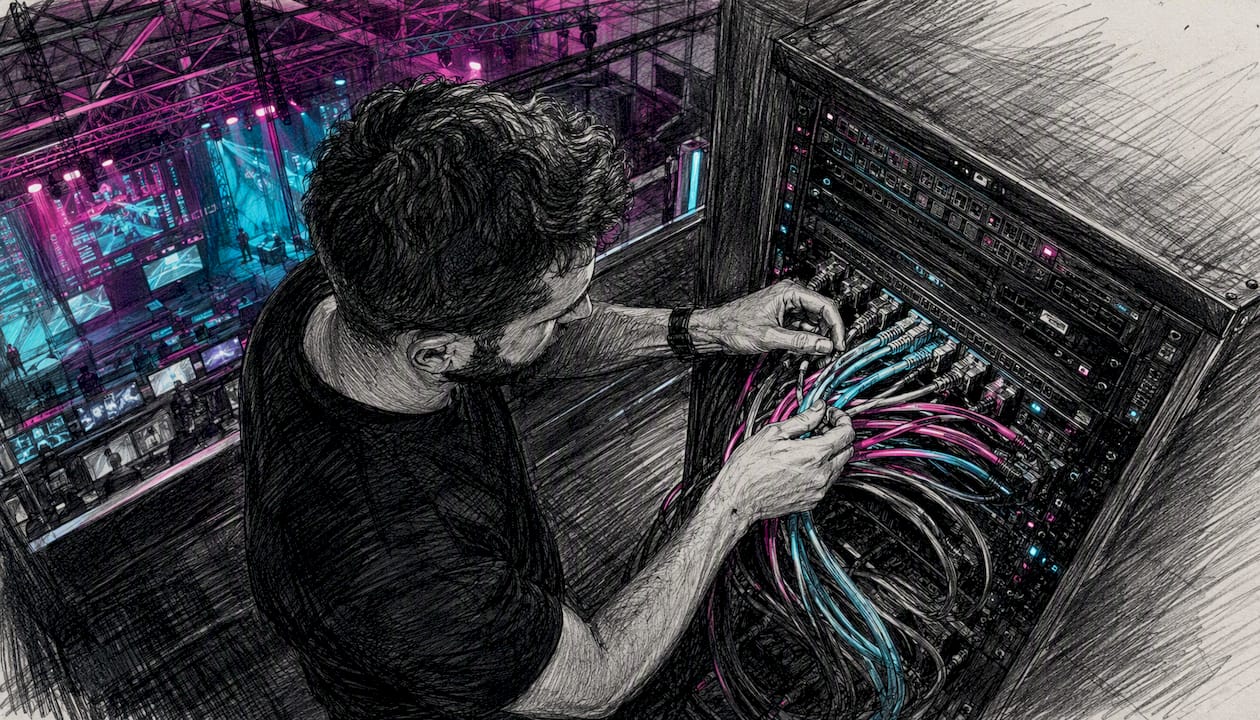
A gaming arena AV system is the integrated network of displays, audio equipment, signal routing, production control, and streaming infrastructure that captures gameplay, processes it in real time, and distributes it simultaneously to in-venue screens, spectators, shoutcasters, and online audiences. Without it, an esports event is just people staring at monitors in silence. Firefly AV is an AV hire and event production company based in Leeds and Preston, working UK-wide, and we specify and supply these systems for everything from university gaming hubs to touring esports finals.
The system’s primary jobs, in order:
- Capture raw gameplay video and audio from each player station
- Route and process those feeds through a production control room (switching, graphics, replay)
- Distribute finished programme to in-venue LED walls and PA systems
- Feed broadcast-grade streams to online platforms and archive
Pro Tip: Where latency is mission-critical, prefer broadcast-grade IP routing using ST2110 or SDVoE over standard commercial AV matrix switchers. The deterministic timing of these protocols prevents the frame-drift that makes competitive play unfair.
Key takeaways
A gaming arena AV system requires broadcast-grade signal routing, a 10GbE IP network, and named crew for each production role to deliver fair, low-latency competition and professional streaming output.
| Point | Details |
|---|---|
| Specify latency targets early | Player-facing displays need ≤16ms end-to-end video latency; agree this in writing before installation. |
| Choose the right transport protocol | SDVoE or ST2110 for broadcast-grade finals; NDI or Dante/AES67 for flexible community venues. |
| Plan power and rigging before the LED wall | Structural load and power circuits must be confirmed before finalising display size and weight. |
| Build in redundancy at every critical path | Redundant switches, failover encoders and UPS cover the failure modes that cause live event disasters. |
| Firefly AV for UK hire and production | Firefly AV supplies esports AV hire and crewed production from Leeds and Preston, UK-wide. |
Table of Contents
- What does a gaming arena AV system actually do?
- What are the key components of a gaming arena AV system?
- How do networking, latency and signal integrity affect an esports venue?
- What does an esports event production workflow look like?
- How do you plan and specify a gaming arena AV install in the UK?
- What does a sample kit list look like for a UK gaming arena?
- What are the most common pitfalls and how do you test before going live?
- How does Firefly AV work with venues and event teams?
- Why broadcast-grade infrastructure is worth the cost
- Get a technical site survey or hire quote from Firefly AV
- Sources
- FAQ
What does a gaming arena AV system actually do?
The short answer: it runs several parallel signal flows at once, each with different latency tolerances and quality requirements. Getting those flows right is what separates a venue that feels professional from one that feels like a LAN party with a projector.
The three main flows are:
- Player station to production: raw HDMI or DisplayPort captures from gaming PCs, routed via KVM or AV-over-IP encoders to the production control room for switching and replay
- Camera feeds to replay, graphics and stream: BirdDog PTZ cameras feeding NDI streams into a production switcher (Panasonic KAIROS, Ross Video) for live cutting, graphics overlay and encoding
A few terms planners regularly encounter on spec sheets:
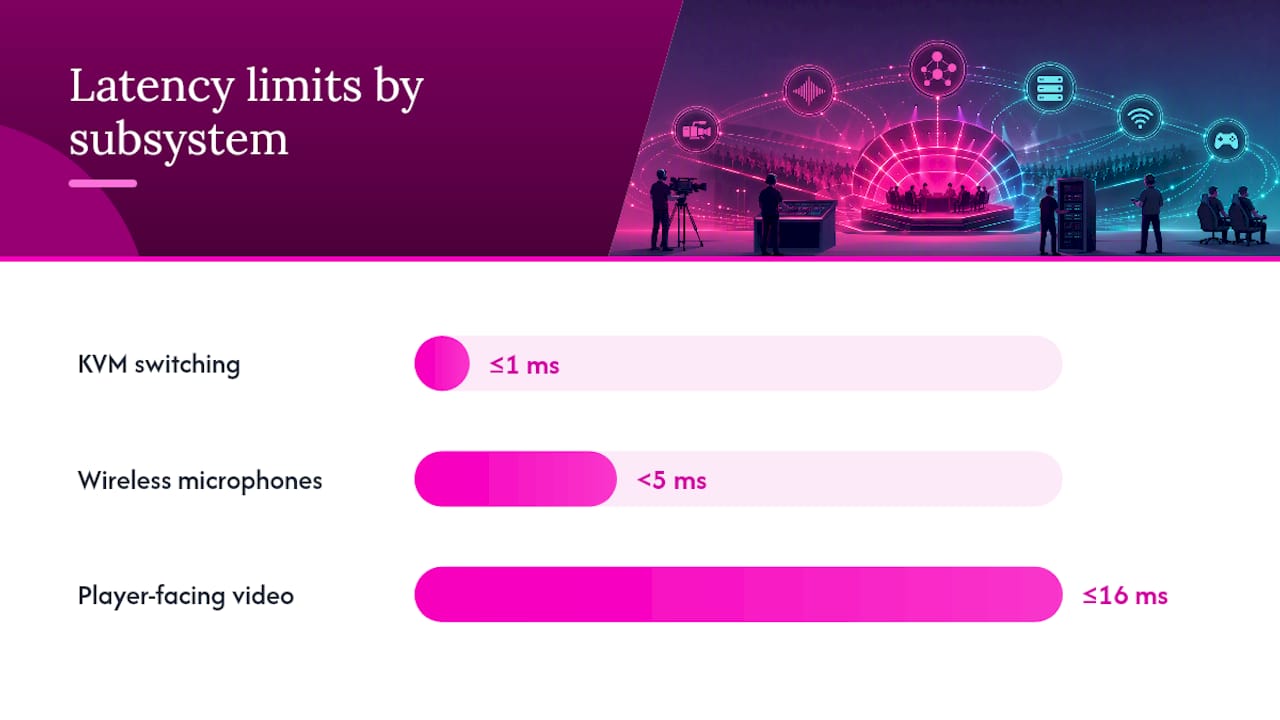
- Low latency: the delay between a player’s action and its appearance on a display or stream; sub-frame latency (under 16ms) is the target for player-facing screens
- KVM (Keyboard, Video, Mouse): a switching system that lets operators control multiple computers from a single point; IHSE systems are commonly specified for professional arenas
- AV-over-IP: the transport of audio and video signals as data packets over an Ethernet network rather than dedicated coaxial or fibre runs; protocols include Dante, NDI, SDVoE and ST2110
Dante handles audio routing across most mid-to-large venues because it runs on standard Ethernet and integrates with consoles from Allen & Heath and others. For video, NDI suits lower-budget or flexible installs; SDVoE and ST2110 suit broadcast-grade productions where deterministic timing is non-negotiable.
What are the key components of a gaming arena AV system?
These component groups determine latency, image fidelity and operational flexibility more than any other single decision. Specify them wrong and no amount of post-installation tweaking recovers the situation.
| Component class | Typical technology | Example brands (UK-available) | Notes |
|---|---|---|---|
| LED video wall | Fine-pitch direct-view LED panels | Absen M2.9 Pro | Pixel pitch ≤2.9mm for close seating; brightness 800–1,200 nits typical |
| Projectors | 4K laser, short-throw options | Panasonic (PT series) | Suited to secondary screens or overflow areas |
| Cameras | PTZ, NDI-native | BirdDog P200 | NDI-native simplifies routing; 4K60 for broadcast |
| Audio console | Digital mixing, Dante-enabled | Allen & Heath Avantis | 64-channel capacity; Dante card for IP audio |
| PA system | Line array or point-source | DB Technologies DVA series | SPL headroom of 10–15dB above programme level |
| Microphones | Handheld, headset, boundary | Sennheiser EW series, MKH range | Wireless for shoutcasters; wired boundary for player stations |
| Comms | Intercom matrix | Riedel Artist/Bolero | Connects tech director, vision mixer, audio engineer |
| KVM switching | High-port centralised KVM | IHSE Draco series | Centralised processing reduces latency and simplifies maintenance |
| AV-over-IP encoders/decoders | SDVoE, NDI, ST2110 | Black Box MCX, BirdDog | 10–40+ units depending on venue size |
| Production switcher | IP-native live production | Panasonic KAIROS, Ross Video | Multi-layer switching; low-latency streaming output |
| Signal distribution | Dante/AES67, ST2110, SDVoE | Dante-enabled hardware | Backbone for audio and video transport |
Purchase versus hire is a genuine decision point. For a permanent venue, owning LED panels and a production rack makes sense over a three-to-five-year horizon. For touring events or university spaces that run esports only occasionally, hiring from a supplier like Firefly AV keeps capital costs down and gives access to current-generation kit without depreciation risk.
On processing architecture: centralised racked processing (KVM, encoders, switchers all in one machine room) simplifies maintenance and enables better redundancy than distributed edge encoders at each player station. The trade-off is longer cable runs and a more complex initial install. For venues running 20 or more player stations, centralised is almost always the right call.
Pro Tip: Plan Lite Deck staging and rigging points before finalising the LED wall specification. A 10m × 4m LED wall at 4.5kg per panel adds up fast; confirm structural load capacity and power distribution early, or the wall design will have to shrink to fit what the building can support.
How do networking, latency and signal integrity affect an esports venue?
Signal integrity and ultra-low latency are mission-critical for esports in a way they simply are not for a conference or awards night. The primary failure modes are ground loops (causing hum and interference), packet loss on congested networks, and firmware incompatibility between encoders and switches.
Transport options and their practical trade-offs:
- Dante / AES67: the standard for professional audio-over-IP; runs on standard Ethernet; AES67 ensures interoperability between manufacturers; latency configurable down to 0.25ms
- NDI: flexible, software-friendly video-over-IP; lower barrier to entry; latency typically 1–4 frames; suited to flexible or lower-budget installs
- SDVoE: zero-compression video transport over 10GbE; sub-frame latency; suited to player-facing displays where any perceptible delay affects gameplay; university deployments using Black Box MCX have demonstrated its practical benefits for distributed routing
- ST2110: broadcast-standard IP video; deterministic timing; used in professional broadcast facilities and increasingly in purpose-built esports arenas migrating away from coaxial workflows
Network planning checklist:
- Separate VLANs for game data traffic, production AV, and venue management
- 10GbE backbone switches with QoS policies prioritising AV traffic
- Redundant switch paths with spanning tree or RSTP failover
- UPS on all production-critical equipment; generator provision for large venues
- Shielded Cat6A or fibre for all AV-over-IP runs; proper grounding at patch panels
- Firmware version matrix documented before commissioning
Pro Tip: For finals-level or broadcast-grade productions, ST2110 or SDVoE is normally preferable to consumer-grade commercial AV matrix switchers. The reason is deterministic timing: ST2110 timestamps every packet so the receiver can reconstruct the signal with frame-accurate precision, regardless of network jitter. A commercial AV matrix cannot offer that guarantee.
AVIXA notes that flexibility is a dominant design driver for esports venues, which means the network architecture needs to support both broadcast-grade finals and casual community gaming on the same infrastructure. Separate VLANs and reconfigurable routing make that possible without rebuilding the network for each event type.
What does an esports event production workflow look like?
End-to-end, the signal flow runs: player station capture → production control room → broadcast/stream output + in-venue LED wall + archive recording. Every step has a named role responsible for it.
Roles and responsibilities:
- Tech director: overall signal flow oversight, calls cuts and manages the production timeline
- Vision mixer: operates the production switcher (KAIROS or Ross Video), cutting between game feeds, cameras and graphics
- Audio engineer: manages the Allen & Heath console, balancing shoutcaster mics, crowd mics, game audio and music beds
- Shoutcasters: provide live commentary from a dedicated booth with Sennheiser microphones and monitor speakers
- Replay operator: manages slow-motion replay clips and highlight packages using dedicated replay servers
- Network engineer: monitors AV-over-IP traffic, encoder health and stream stability throughout the event
Step-by-step workflow:
- Capture: player PCs output via HDMI/DisplayPort to AV-over-IP encoders (Black Box MCX or BirdDog) or KVM (IHSE Draco); feeds arrive in the production control room as IP streams
- Mix and switch: the vision mixer selects between game feeds, shoutcaster cameras and graphics using the production switcher; Panasonic KAIROS handles multi-layer compositing with ultra-low latency for large-scale streaming
- Graphics and overlays: Disguise or Ross Video graphics engines add scoreboards, player stats and sponsor overlays in real time
- Replay: the replay operator pulls highlights and slow-motion clips; these feed back into the switcher for broadcast and in-venue display
- Encode and stream: the programme output is encoded (hardware or software encoders) for simultaneous delivery to Twitch, YouTube and any IPTV feeds; a separate clean feed goes to the LED wall
- Monitor: the network engineer watches encoder health, stream bitrate and AV-over-IP packet loss on a dedicated monitoring display; any fault triggers a pre-planned failover route
For multi-platform outputs, a typical arrangement uses separate encoder instances for each destination: one for the in-venue LED wall (low latency, uncompressed or lightly compressed), one for the broadcast stream (CBR H.264 or H.265 at platform-specified bitrate) and one for archive. Riedel comms keeps all roles connected throughout.
Note for published version: a boxed signal-flow diagram showing Capture → Switcher → Graphics → Encoder → CDN alongside the in-venue LED wall output would help planners visualise the routing at a glance.
How do you plan and specify a gaming arena AV install in the UK?
Specify to the use case first. A community gaming hub at a university needs different infrastructure from a touring esports finals venue or a purpose-built broadcast studio. Getting that framing right before any procurement conversation saves significant cost and avoids over-engineering.
Planning phases:
- Concept: define the use cases (community, competitive, broadcast), player count, audience capacity and streaming requirements
- Technical design: produce a signal flow diagram, network topology, power schedule and rigging plan; involve a systems integrator at this stage
- Procurement or hire: issue an RFP with specific brand/model requirements and measurable parameters; decide hire vs purchase per component
- Installation: cable infrastructure first, then rack build, then AV-over-IP commissioning; allow time for LED wall manufacturing lead times
- Test and acceptance: staged testing against agreed pass/fail criteria (see Section 8)
- Operator training: minimum one full day; document all configurations
Typical UK project timeline:
| Milestone | Typical lead time (UK) | Notes |
|---|---|---|
| Site survey and concept design | 1–2 weeks | Requires venue plans and power schedule |
| Technical design and RFP | 2–4 weeks | Integrator involvement recommended |
| LED wall manufacturing and delivery | 6 weeks | Absen and similar; order early |
| Rack build and pre-configuration | 2–3 weeks | Off-site where possible |
| On-site installation and cabling | 1–3 weeks | Depends on venue complexity |
| Commissioning and testing | 3–5 days | Allow more for large installs |
| Operator training | 1–2 days | On-site with full system live |
UK cost guidance (approximate hire or install bands):
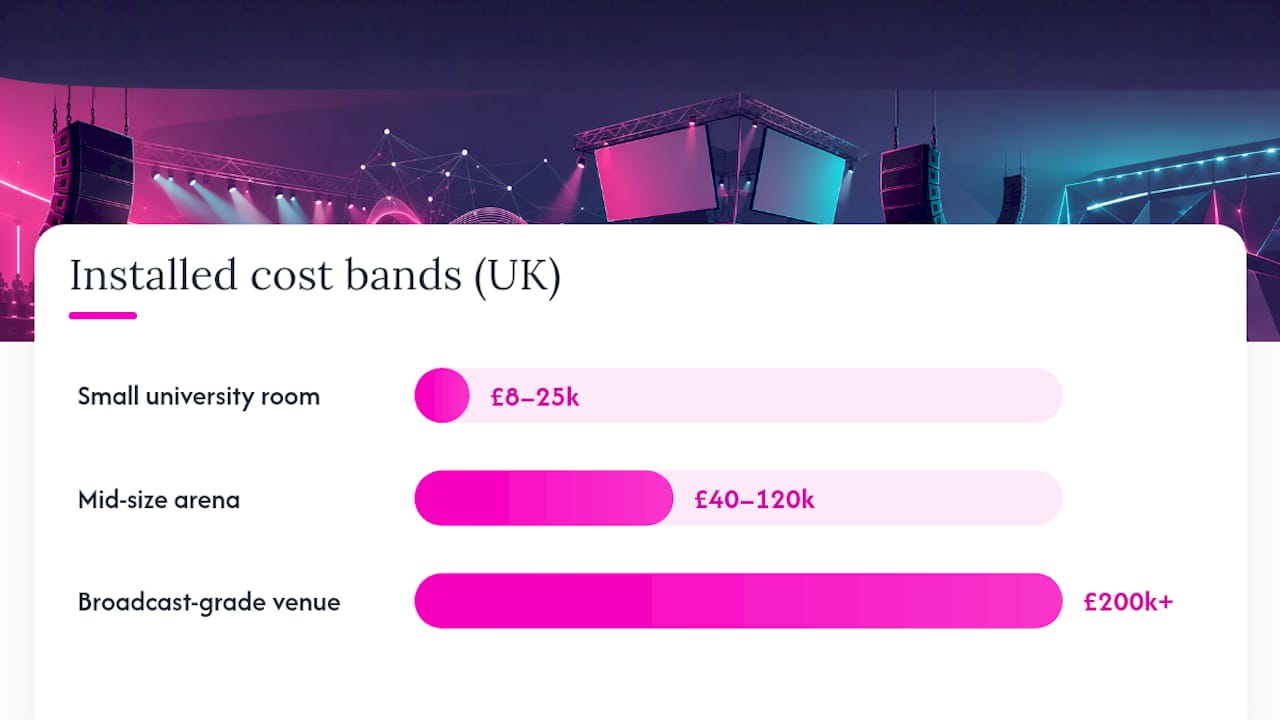
- Small university gaming room (8–16 stations, basic LED wall, stereo PA): £8,000–£25,000 installed, or £1,500–£4,000/day hire including crew
- Mid-size arena (32–64 stations, large LED wall, full PA, production control): £40,000–£120,000 installed, or £5,000–£15,000/day hire
- Purpose-built broadcast-grade venue: £200,000+ installed; day rates for technicians typically £250–£600 per person depending on role and experience
For LED screen setup and power planning, budget at least one 32A three-phase circuit per 20–25 square metres of LED wall, plus dedicated circuits for production racks and PA amplifiers.
Regulatory checklist:
- PAT testing for all portable electrical equipment before each event
- Fixed wiring inspection (BS 7671) for permanent installs
- Local authority premises licence conditions (noise limits, occupancy, fire egress)
- Noise at Work Regulations 2005: monitor and limit audience and crew exposure above 80dB(A)
- Structural engineer sign-off for rigging points above 250kg total load
- CDM Regulations 2015 apply to larger permanent installations
SDVoE’s analysis of AV opportunities in esports venues highlights that specialist integrators are increasingly necessary as venue complexity grows, particularly for IP network design and broadcast integration. Involving one at the technical design stage, not after procurement, is the single most cost-effective decision a venue manager can make.
What does a sample kit list look like for a UK gaming arena?
Planners should ask for specific brand names, model numbers and measurable parameters in every hire quote or RFP. Vague specifications (“a good LED wall”) produce inconsistent results and make like-for-like comparison impossible.
| Function | Example kit | Key specification |
|---|---|---|
| LED video wall | Absen M2.9 Pro | 2.9mm pixel pitch; 1,000 nits brightness; 60Hz refresh |
| Projector (secondary) | Panasonic PT-RZ series | 4K laser; high brightness; lens shift |
| Cameras | BirdDog P200 PTZ | NDI-native; 4K60; PoE+ powered |
| Audio console | Allen & Heath Avantis | 64-channel digital; Dante card; 96kHz |
| PA system | DB Technologies DVA series line array | High SPL performance; Dante-enabled amplifiers |
| Microphones | Sennheiser EW-DX (wireless), MKH 416 (commentary) | <5ms wireless latency; broadcast-grade capsule |
| Comms | Riedel Artist / Bolero wireless | Full-duplex; scalable to many panels |
| KVM switching | IHSE Draco tera series | Sub-1ms latency; 4K60 support |
| AV-over-IP | Black Box MCX (SDVoE) | Zero-compression; 10GbE; sub-frame latency |
| Production switcher | Panasonic KAIROS / Ross Video | IP-native; multi-layer; low-latency stream output |
| Signal processing | Dante/AES67 network | 0.25ms configurable latency; standard Ethernet |
| Broadcast comms | Riedel MediorNet / Brompton Technology (LED processing) | Brompton Tessera for LED calibration and processing |
Confetti X, a purpose-built educational esports facility, demonstrates what an integrated specification looks like in practice: a 10m × 4m 4K LED wall, a broadcast gallery and dedicated training suites, all on a unified IP infrastructure.
Specification parameters to request in any RFP:
- LED pixel pitch ≤2.9mm for seating within 5m of the screen
- 4K60 camera feeds for broadcast outputs
- Dante/AES67 compatibility across all audio devices
- Audio system headroom of at least 10dB above peak programme level
- End-to-end video latency ≤1 frame (≤16ms at 60Hz) for player-facing displays
- KVM switching latency ≤1ms for player stations
Hire quote checklist:
- Dry hire vs crewed hire (Firefly AV offers both; two-day hire week as standard)
- Transport and logistics included or quoted separately
- Spares kit specified (spare encoder, spare cable runs, spare wireless mic body)
- On-site technical contact and escalation path named in the contract
- Commissioning and de-rig days included in the day-rate calculation
For a detailed comparison of LED walls versus projectors in gaming venues, pixel pitch and ambient light rejection are the two parameters that matter most for audience-facing displays.
What are the most common pitfalls and how do you test before going live?
Most failures are preventable with staged testing and simple redundancy measures. The ones that are not preventable are almost always caused by skipping the test phase to save a day’s hire cost.
Pre-event testing checklist:
- Latency test: measure end-to-end delay from player input to LED wall display using a high-speed camera; target ≤1 frame for player screens, ≤3 frames for spectator screens
- Sync across screens: play a frame-accurate test signal across all displays simultaneously and verify no visible offset between panels or screens
- Audio loopback: route a test tone through the full signal chain (console → PA → room measurement mic) and verify SPL, frequency response and absence of hum or buzz
- KVM responsiveness: test all player stations for input latency and verify IHSE switching operates within specification
- Encoder stream stability: run each encoder at target bitrate for 30 minutes and monitor for dropped frames, bitrate spikes and packet loss
- Failover test: deliberately disconnect a primary encoder or switch path and verify the redundant path takes over within the agreed recovery time
Pro Tip: Set acceptance criteria in writing before installation begins. Typical targets: maximum 16ms end-to-end video latency for player displays; maximum 5ms audio latency from mic to PA; hot-swap failover within 2 seconds for production-critical paths. Without agreed numbers, “it feels a bit slow” is not a contractual failure.
Common pitfalls:
- Mis-specified network: using unmanaged switches or consumer routers for AV-over-IP traffic causes packet loss and sync failures; always use managed 10GbE switches with QoS
- Inadequate power and rigging: LED walls and PA systems draw significant power; under-provisioned circuits cause breaker trips mid-event
- Broadcast and venue audio mismatch: running a single audio mix for both the in-venue PA and the broadcast stream produces a mix that works for neither; always split to separate mix paths early in the signal chain
- Poor documentation: undocumented IP addresses, VLAN assignments and patch panel layouts make fault-finding during an event extremely slow
For a broader look at integrated AV installation engineering, the same staged commissioning principles apply across venue types.
How does Firefly AV work with venues and event teams?
Firefly AV operates from bases in Leeds and Preston, covering the whole of the UK for esports and gaming events, from single-day university tournaments to multi-day touring finals. Services span equipment hire (dry or crewed), site surveys, technical rider creation, full production management and hybrid or virtual event delivery.
Service features and operational process:
- Site survey: Firefly AV visits the venue to assess power, rigging points, network infrastructure and sightlines before any equipment is specified
- Technical rider creation: we produce a detailed rider document covering signal flow, power requirements, rigging loads and crew requirements, ready for venue sign-off
- Test and acceptance: all systems are tested against agreed criteria before the event goes live; no handover without a signed acceptance sheet
- Two-day hire week: standard hire period is two days, with short and long-term options available
- Dry hire: equipment available without crew for experienced in-house teams
- Crew day rates: technicians, project managers and full production crews available; day rates typically £250–£600 depending on role
- Escalation paths: named technical contact on-site throughout the event; direct line to Leeds or Preston for remote support
Clients include the BBC, Leeds City Council and the University of Bradford, which gives a sense of the range of production scales Firefly AV handles. For esports specifically, the pattern of work mirrors what university gaming hubs and purpose-built arenas like Confetti X require: integrated LED walls, IP audio networks, production control rooms and streaming infrastructure, all specified and crewed by people who understand the difference between a broadcast mix and a venue mix.
When contracting, ask for the following in any quote: warranty and breakdown cover for hired equipment, spares kit specification, transport and logistics costs, comms and control room access arrangements, and named crew with relevant experience.
Why broadcast-grade infrastructure is worth the cost
The instinct to save money by specifying commercial AV matrix switchers instead of broadcast-grade IP routing is understandable. The problem is that commercial AV was not designed for the timing precision that esports demands. A frame of delay on a spectator screen is invisible; the same delay on a player’s monitor affects their reaction time and, in a competitive context, the fairness of the event.
The shift toward ST2110 and SDVoE in purpose-built arenas is not driven by brand preference. It is driven by the fact that these protocols offer deterministic timing that commercial AV simply cannot match at scale. For a university gaming lab running casual sessions, NDI and a managed 10GbE switch is entirely adequate. For a finals event with broadcast obligations and prize money at stake, the cost of broadcast-grade infrastructure is a fraction of the reputational cost of a sync failure on stream.
Staffing follows the same logic. A single AV technician can manage a small community event. A broadcast-grade finals needs a tech director, vision mixer, audio engineer, replay operator and network engineer working in parallel. Specifying the infrastructure without specifying the crew to run it is one of the most common planning errors we see. The kit is only as good as the people operating it.
Get a technical site survey or hire quote from Firefly AV
Firefly AV supplies AV equipment hire and full event production for esports and gaming venues across the UK, from Absen LED walls and Allen & Heath consoles to BirdDog cameras, DB Technologies PA systems and full production crews. The difference from booking kit off a generic hire list is that every quote starts with a site survey: we look at your power, rigging, network and sightlines before recommending anything.
To get a quote or book a site survey, have the following ready: venue floor plans with rigging point locations, available power circuits (amperage and phase), intended game formats and player count, and your streaming or broadcast requirements. Contact Firefly AV via Fireflyav or call the Leeds office directly. Response time for initial quotes is typically within one working day.
Sources
Planners specifying gaming arena AV systems should consult the following:
- Achievement unlocked: how a leading esports arena changes the game — Inavate
- AVIXA — articles on pro AV trends and venue design
- Esports challenge — Sound & Video Contractor (SVC Online)
FAQ
What is a gaming arena AV system?
A gaming arena AV system is the integrated set of displays, audio equipment, signal routing and production infrastructure that captures gameplay, processes it in real time, and distributes it to in-venue screens, spectators and online streams. It differs from standard event AV in its requirement for sub-frame video latency and multi-platform simultaneous output.
What are the main types of gaming arenas?
Gaming arenas broadly fall into three categories: community gaming hubs (university rooms or local venues with 8–32 stations and basic streaming), mid-size competitive arenas (32–64 stations, large LED walls, full PA and production control), and purpose-built broadcast-grade venues designed for televised finals with full broadcast gallery infrastructure.
Why is low latency so important for esports AV?
Latency on player-facing displays directly affects competitive fairness: a delay of even one frame (16ms at 60Hz) can alter a player’s reaction time. Spectator and broadcast feeds tolerate slightly more delay, but player monitors require sub-frame end-to-end latency, which is why SDVoE and ST2110 are preferred over standard commercial AV matrix switchers for professional events.
What does esports AV cost in the UK?
Hire costs for a small university gaming room typically run £1,500–£4,000 per day including crew; a mid-size arena with full LED wall and production control runs £5,000–£15,000 per day. Permanent installations range from roughly £8,000 for a small room to £200,000 or more for a purpose-built broadcast venue. Technician day rates in the UK typically fall between £250 and £600 depending on role.
What is the difference between NDI, Dante and ST2110?
Dante is an audio-over-IP protocol running on standard Ethernet, configurable to 0.25ms latency. NDI is a software-friendly video-over-IP protocol suited to flexible or lower-budget video routing. ST2110 is a broadcast-standard IP video suite offering deterministic, frame-accurate timing for professional multi-feed productions. Each suits a different point on the cost-versus-performance spectrum.