What is a virtual event studio? A planner’s guide
Date added: 8/07/2026

A virtual event studio is a purpose-built production environment that combines LED walls, real-time rendering engines, and broadcast-grade audiovisual technology to deliver professional online events without traditional post-production. The term sits alongside “virtual production studio” in industry usage, and both refer to the same core concept. Where a conventional event space relies on physical sets and green screen compositing, a virtual event studio produces the final image live on set. For event planners and corporate communication professionals, this distinction changes everything about how you plan, budget, and execute online events.
What is a virtual event studio made of?
A virtual event studio is defined by its LED walls and real-time digital environments, which display backgrounds live during filming rather than adding them in post-production. This single characteristic separates virtual studios from every other production method. The background your audience sees is the background your presenter sees, in the room, in real time.
The core components of a virtual event studio include:
- LED volume walls. Large curved or flat LED panels display photorealistic digital environments. They replace physical sets and green screens entirely.
- Real-time rendering engines. Software such as Unreal Engine generates and updates digital backgrounds at broadcast frame rates, responding to camera movement without lag.
- Camera tracking systems. Sensors attached to cameras feed positional data to the rendering engine, so the virtual background shifts in perspective as the camera moves. The result looks physically correct.
- Broadcast lighting rigs. Lighting is designed to match the colour temperature and directionality of the digital environment displayed on the LED wall, so presenters appear naturally lit by their surroundings.
- Audio systems. Broadcast-grade microphones, mixing desks such as the Allen & Heath Avantis, and acoustic treatment keep dialogue clean regardless of the visual complexity around the speaker.
- Studio control software. Platforms such as Pixotope integrate real-time rendering, camera tracking, and LED control into a single workflow, enabling live compositing without a green screen in sight.
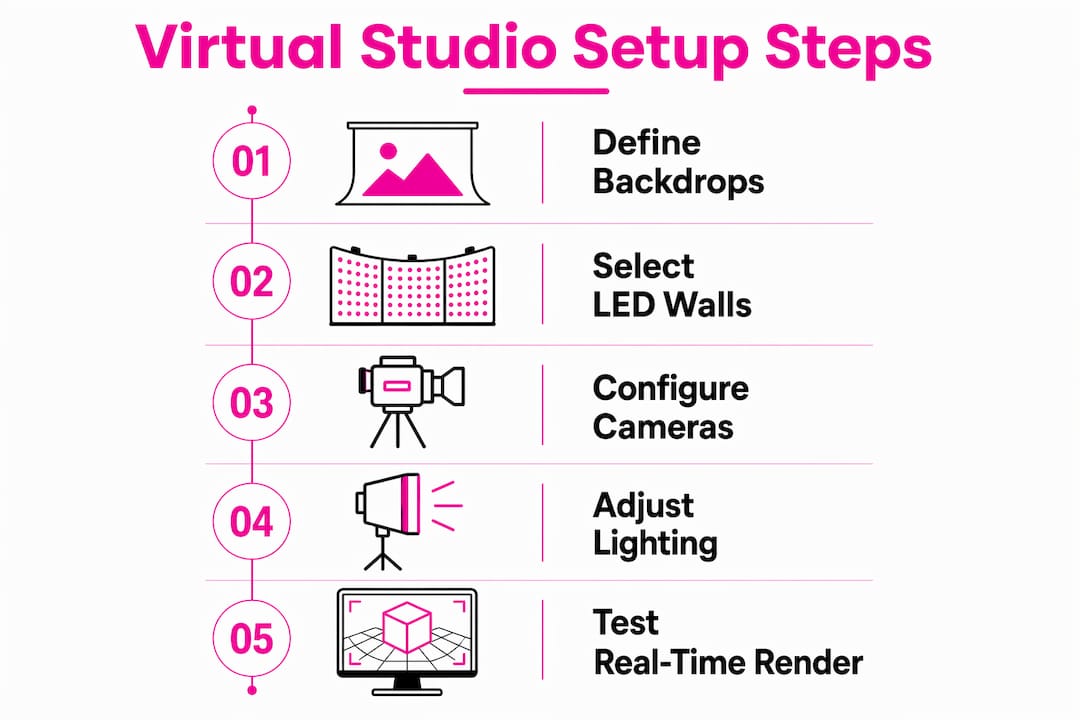
Pro Tip: Scope your digital environments before production day. Defining backdrops, colour palettes, and lighting conditions in pre-production prevents costly baked-in errors that are extremely difficult to correct during a live stream.
How does a virtual studio differ from green screen?
The difference between a virtual LED studio and a green screen setup is not cosmetic. It is structural, and it affects every stage of your production.
| Feature | Green screen setup | Virtual LED studio |
|---|---|---|
| Background visible on set | No | Yes, in real time |
| Post-production editing required | Extensive | Minimal |
| Lighting match to background | Manual, approximate | Automatic, live |
| Presenter eyeline accuracy | Difficult to achieve | Natural and correct |
| On-set approval of final image | Not possible | Immediate |
Green screen requires your presenter to perform in front of a flat, uniformly lit surface with no visual reference for the world they are supposedly standing in. Directors cannot approve the final image until editing is complete. Mistakes in lighting or framing are discovered late, when they are expensive to fix.
A virtual LED studio removes that uncertainty. Actors and presenters interact naturally with the environment because the environment is physically present on the LED wall in front of them. Eyelines are correct. Lighting from the wall wraps around the presenter’s face and clothing in a way that no post-production colour grade can fully replicate. The director, the client, and the presenter all see the same final image at the same moment.
Post-production requirements decrease dramatically because backgrounds and lighting are captured live. For corporate event planners working to tight turnaround schedules, this is not a minor convenience. It is a fundamental change to how quickly finished content reaches your audience.
What are the benefits of a virtual event studio for planners?
Virtual event studios offer event planners and corporate communicators a set of advantages that traditional production methods cannot match. The most significant is the live feedback loop.
All participants, including producers, directors, and speakers, view the final output in real time. This shared visibility means creative decisions happen in the room, not in an edit suite days later. A corporate communications director can approve a branded environment before a single frame is recorded for broadcast.
The practical benefits extend well beyond creative approval:
- Higher production value at lower cost. Physical sets require construction, transport, and storage. A virtual studio replaces all of that with a digital asset that can be updated for each event.
- Reduced post-production time. Because the final image is captured live, your team spends less time in editing and more time on content strategy.
- Hybrid event capability. Hybrid event studios combine live venue elements with virtual production technology, including broadcast-grade production and interactive features such as Q&A boards and live chat integration. Your in-room audience and your remote audience receive the same quality experience.
- Global reach without travel. Presenters in different locations can appear within the same virtual environment simultaneously, removing the logistical cost of flying speakers to a single venue.
- Brand consistency. Digital environments are built to specification. Every event uses the exact same branded backdrop, with no variation caused by physical set construction or venue lighting conditions.
For corporate events that rely on AV to communicate authority and professionalism, a virtual studio raises the production floor significantly.
How to set up a virtual event studio for your next event
Setting up a virtual event studio requires structured pre-production. The technology performs best when every decision about the environment is made before the cameras roll.
- Define your environment in pre-production. Decide on the digital backdrop, colour palette, and lighting conditions before booking studio time. Early environment scoping is the single most important factor in avoiding expensive errors during a live event.
- Audit your hardware requirements. Confirm that your LED wall resolution, camera tracking system, and rendering hardware meet the demands of your broadcast format. For live switcher functionality, a device such as the Blackmagic Design ATEM Mini PRO handles multi-source switching without adding post-production complexity.
- Choose your streaming platform early. Platform choice affects encoding settings, latency, and interactive feature availability. Supporting multiple platforms ensures global reach and client confidence, particularly for large-scale corporate events.
- Build a real-time feedback loop into your rehearsal. Run a full technical rehearsal with all stakeholders watching the live output. Identify lighting mismatches, camera tracking drift, and audio issues before the event day.
- Integrate interactive tools. Q&A boards, live polling, and chat integration connect your remote audience to the event. A well-designed live streaming platform blueprint accounts for these features at the architecture stage, not as an afterthought.
- Plan your post-event content. Because virtual studios produce broadcast-quality footage in camera, the recorded output is ready for repurposing with minimal editing. Build this into your content calendar from the start.
Pro Tip: Assign a dedicated technical director whose sole responsibility is monitoring the LED wall output and rendering engine during the live event. Directors focused on talent and timing rarely catch rendering artefacts before they reach the audience.
Understanding how LED video walls differ from projectors also helps planners make informed decisions when specifying studio hardware, particularly for venues where ambient light is difficult to control.
Key takeaways
A virtual event studio produces broadcast-quality results live on set by combining LED walls, real-time rendering, and camera tracking, removing the need for extensive post-production.
| Point | Details |
|---|---|
| Core definition | A virtual event studio uses LED walls and real-time rendering to display digital environments live during production. |
| Green screen advantage | Virtual LED studios capture final visuals in camera, cutting post-production time and cost significantly. |
| Collaboration benefit | All stakeholders view the final output in real time, enabling immediate creative decisions on set. |
| Hybrid event potential | Virtual studios support hybrid formats by combining live venue elements with digital tools and global streaming. |
| Pre-production priority | Scoping digital environments and lighting before production day is the most effective way to prevent costly errors. |
Why I think planners underestimate virtual studios
Most event planners I speak with assume virtual studios are a broadcast industry tool, relevant to film and television but not to corporate events. That assumption costs them money and quality in equal measure.
The real-time collaboration model that virtual production enables is genuinely different from anything a green screen workflow offers. When a communications director can stand in the studio and approve the branded environment before a single presenter walks on set, the number of revision cycles drops sharply. That time saving alone often justifies the technology investment.
What I find most underappreciated is the hybrid potential. A well-configured virtual studio does not force you to choose between a physical event and an online one. It produces both simultaneously, at broadcast quality, with the same crew. For organisations running annual conferences or product launches, that capability changes the economics of event production entirely.
My practical advice: treat the digital environment as you would a physical set design. Commission it early, review it with your director and your client, and lock it before you book studio time. The planners who struggle with virtual production are almost always the ones who treat the backdrop as a technical detail rather than a creative decision.
— Michael
How Fireflyav supports your virtual event studio production
Fireflyav works with event planners and corporate communications teams across the UK to supply the equipment and technical expertise that virtual event production demands.
From broadcast-grade AV equipment to on-site technical support for live and hybrid events, Fireflyav covers the full production chain. The team brings experience across corporate conferences, eSports broadcasts, and cultural events, which means your virtual studio setup is handled by engineers who understand both the technology and the pressure of a live event. Start your next virtual event project by submitting a project enquiry and a member of the Fireflyav team will advise on the right equipment and support package for your brief.
FAQ
What is a virtual event studio?
A virtual event studio is a production space that uses LED walls and real-time rendering software to display digital environments live on set, replacing physical sets and green screens for online event production.
How does a virtual studio improve event production quality?
Virtual studios capture the final image in camera, so lighting, backgrounds, and presenter eyelines are all correct without post-production editing. This produces broadcast-quality results faster and at lower cost than green screen methods.
What equipment does a virtual event studio need?
The core equipment includes LED volume walls, a real-time rendering engine such as Unreal Engine, camera tracking hardware, broadcast lighting, and studio control software such as Pixotope for integrated live compositing.
What is the difference between virtual and physical events?
Physical events require venue logistics, set construction, and travel. Virtual event studios remove those constraints by delivering immersive, broadcast-quality environments digitally, while hybrid formats combine both for simultaneous in-room and online audiences.
Can a virtual studio support hybrid events?
Hybrid event studios combine live venue elements with virtual production technology, including interactive features such as Q&A boards and live chat, giving in-room and remote audiences an equally high-quality experience.